
Getting Started with Kontenum CDN
Kontenum CDN is designed to accelerate your content delivery across Indonesia with minimal configuration.
Access & Account Creation
Currently, Kontenum is available by invitation only.
To get started:
- Visit www.kontenum.com
- Request a free trial from the homepage
- Our team will contact you shortly
- Once approved, we will create your account and provide access to the Console
After your account is ready, you can immediately start creating CDN sites.
Key Concept: What Is a Site?
In Kontenum, a Site represents a CDN configuration similar to a CDN zone or distribution in other providers.
A Site defines:
- Where your content originates from (Origin)
- Which domain your users will access (Delivery Domain)
- How traffic is fetched and delivered through Kontenum’s CDN
Each Site is deployed independently and can be managed from the Sites section in the Console.
Quick Start: Create Your First Site
You can create your first CDN Site in just a few minutes.
Navigate to:
Console → Sites → Create New Site
You will see a form similar to the screen below.
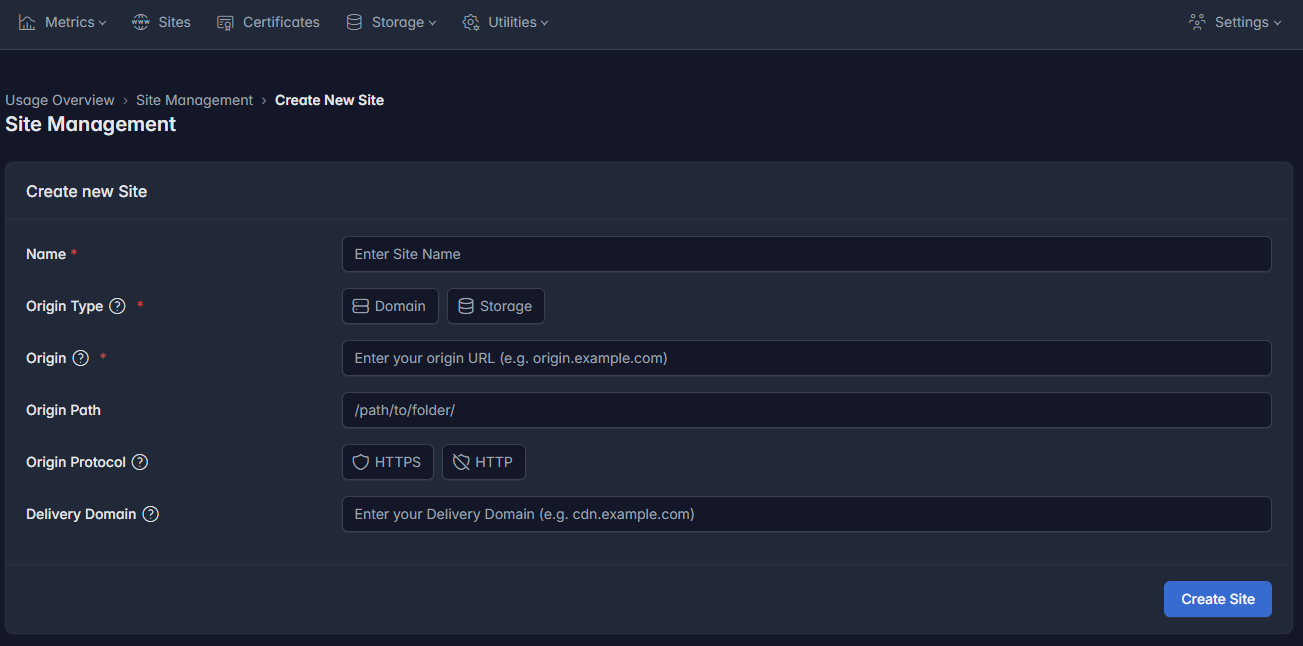
Site Configuration Fields
1. Site Name
Give your site a descriptive name to easily identify it later.
Example:
my-website-cdn
2. Origin Type
Choose where your original content is hosted.
- Domain – Use an existing website or server as the origin
- Storage – Use Kontenum Storage as the origin (for static assets)
For most first-time setups, choose Domain.
3. Origin Domain
Enter the domain where your content is currently served from.
Example:
origin.example.com
Kontenum will fetch content from this origin and cache it across our CDN network.
4. Origin Path (Optional)
Specify a sub-path if only part of your origin should be served through the CDN.
Example:
/assets/
Leave this empty to serve content from the root path.
5. Origin Protocol
Select the protocol used to connect to your origin:
- HTTPS (recommended)
- HTTP
Make sure this matches your origin server configuration.
6. Delivery Domain
This is the domain your end users will access.
Typically, this is a domain you own and control.
Example:
cdn.example.com
⚠️ Make sure you can configure DNS records for this domain.
Deploy the Site
Once all fields are filled:
- Click Create Site
- Deployment will start automatically
- The process usually takes around 5 minutes
After deployment completes, your first CDN Site is live 🎉
What’s Next?
After your site is deployed, you can:
- Configure DNS to point your Delivery Domain to Kontenum
- Enable HTTPS certificates (your own certificates or via ACME feature)
- Monitor traffic and usage in Metrics
Explore the rest of the documentation to unlock the full power of Kontenum CDN.
If you need help at any step, feel free to contact our support team.